Nobl9 application (1.205.0)
- More answers from Nobl9 Assist
- Rate Nobl9 Assist answers
- Claude and ChatGPT setup for the Nobl9 MCP server
Release details
new Light and dark themes
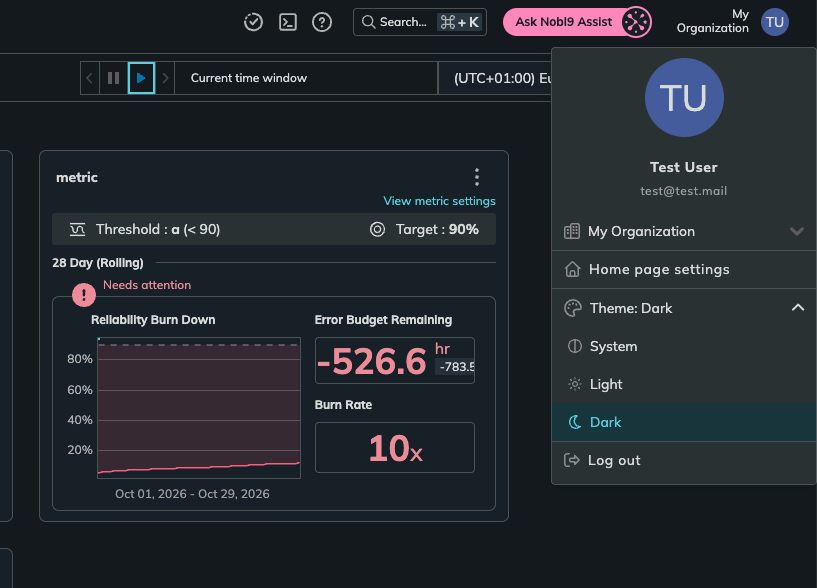
Nobl9 Web now has a dark theme. Open the user menu and choose System, Light, or Dark under Theme. System is the default and follows your operating system appearance, switching automatically when it changes.
Your choice is saved in the browser, not in your Nobl9 account, so set it on each browser you use. Charts, including the Alerting Center heatmap, adapt to the selected theme.
improved More answers from Nobl9 Assist
Nobl9 Assist can now answer more questions about your organization:
- Ask for Reliability Rollup scores and which reports include an SLO.
- Check your usage against contracted quotas.
- Check the status of a Replay, or ask Nobl9 Assist to start one. Nobl9 Assist shows the proposed Replay in the chat, and it runs only after you approve it.
- Get SLI Analyzer results.
improved Rate Nobl9 Assist answers
You can now rate each Nobl9 Assist answer as Helpful or Not helpful. When you select Not helpful, you can choose what went wrong, such as Wrong numbers or facts or Didn't answer the question. Your ratings help us improve Nobl9 Assist.
improved Claude and ChatGPT setup for the Nobl9 MCP server
The Nobl9 MCP server setup in Integrations > Connectors now has Claude and ChatGPT tabs. They walk you through adding Nobl9 from the Claude Connectors Directory and the ChatGPT plugin directory. The Nobl9 connector and plugin are available for organizations on app.nobl9.com.
The Claude Code and Codex tabs now note that once you add Nobl9 in Claude or ChatGPT, it's also available in Claude Code or Codex.