Nobl9 Assist Labs
Nobl9 Assist is an in-context AI assistant built into the Nobl9 Web application. You ask questions in plain language, and it answers using live data from your organization: SLOs, error budgets, burn rates, alerts, and configuration. It can also draft and apply configuration changes—but never on its own: every change requires your explicit approval in the chat, and every chat starts fresh.
Nobl9 Assist is available to Nobl9 clients, but AI features must be enabled for your organization before users can access it.
Because it is a Labs feature, it can be unavailable, and its behavior can change without notice. Answers can be incomplete or wrong—double-check results before acting on them.
What Nobl9 Assist does
Nobl9 Assist answers data-driven questions about your reliability. Before it answers a quantitative question, it reads the relevant live data through the same read-only interface as the Nobl9 MCP server, scoped to your organization and your permissions. It works best on questions your data can answer, for example:
- Which SLOs are burning, at risk, or out of error budget right now.
- Why a particular SLO's budget is draining, backed by its recent metrics.
- Which alerts fired for a service, and what alert policies and silences exist.
- How a feature works or how to configure it, grounded in the Nobl9 documentation.
Beyond answering questions, Nobl9 Assist can create, update, and delete Nobl9 objects—each change gated behind an approval card in the chat. Nothing changes in your organization until you approve it, and approved changes run with your own permissions.
Opening Nobl9 Assist
Click Ask Nobl9 Assist in the top bar of the Nobl9 Web application. A chat panel slides in on the right and stays available as you move around the app. You can:
- Expand the panel to full screen or collapse it back to a side panel.
- Drag the panel header to reposition it.
- Close the panel while an answer is still streaming: the conversation keeps going, and the answer is there when you reopen it.
- Clear the conversation with the clear button or by typing
/clear, and restore it with Restore if you change your mind.
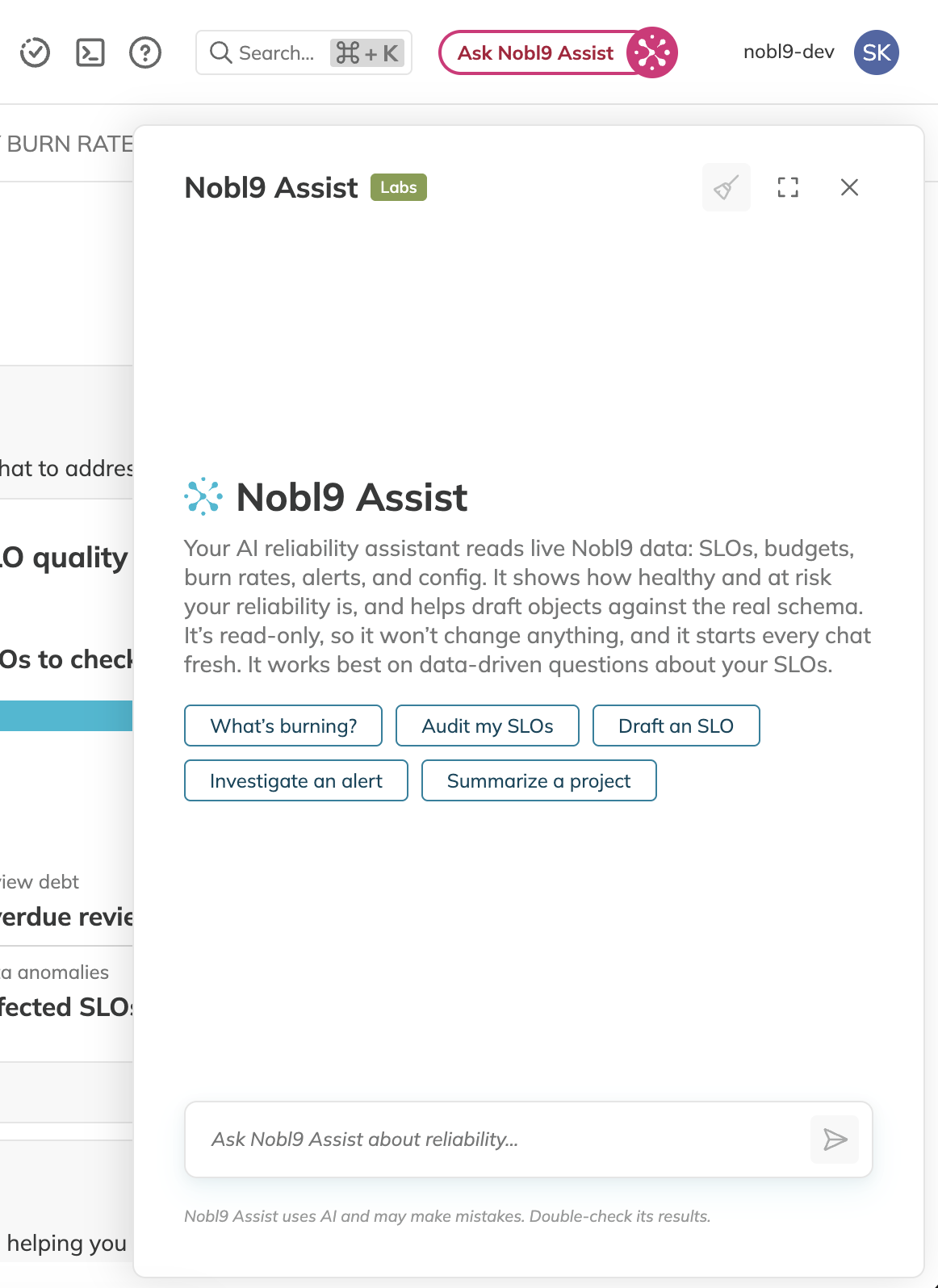
Nobl9 Assist is context-aware. When you open it on an SLO details page or inside a project, it knows what you're looking at and tailors its quick actions to it—for example, What's burning? on the home page or budget and burn-rate questions for the SLO you have open. You can remove the context pill if you'd rather ask organization-wide questions.
What you can ask
Reference resources in a prompt
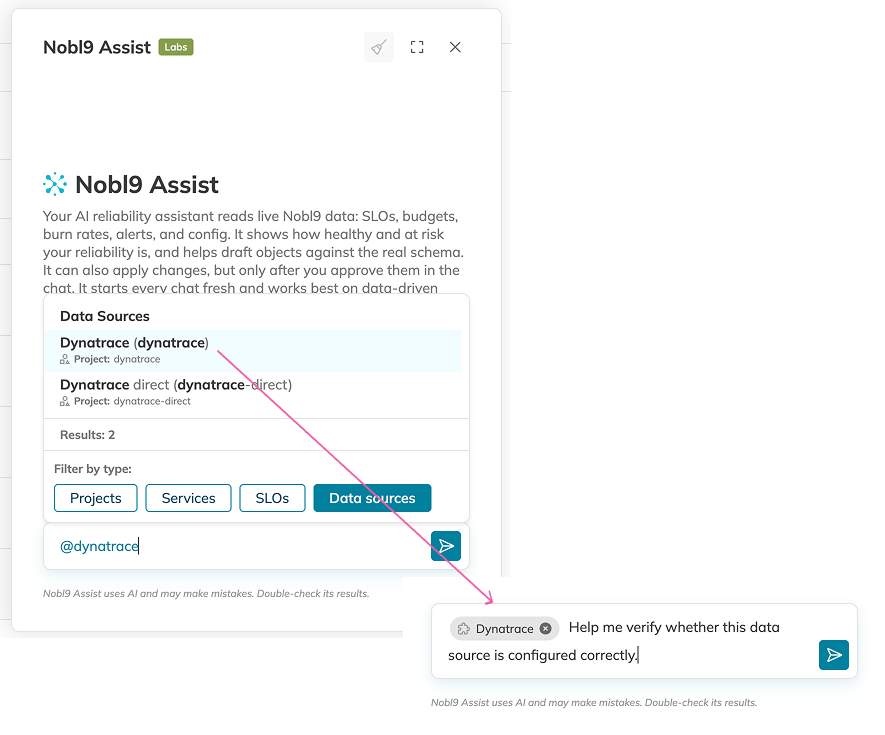
When your question is about a particular resource, type @ in the message composer to attach it to your prompt. Referencing a resource gives Nobl9 Assist its exact identity, so it can use the intended item even when multiple resources have similar names.
- Type
@, then search for the resource by name. To narrow the results, select a resource type filter. - Select a project, service, SLO, or data source. It appears as a pill in your message.
- Continue writing your question and send it. To remove a selected resource before you send, use the pill's remove control.
For example, reference an SLO and ask why its error budget is draining, or reference a data source when you need help with its configuration.
SLO health and error budgets
Ask which SLOs are healthy, at risk, exhausted, or reporting no data, either organization-wide or within a project. Nobl9 Assist reads the live error-budget breakdown, so answers reflect the current state, and it flags no-data SLOs separately instead of treating them as healthy.
Alerts, silences, and annotations
Ask about fired alerts, alert policies and methods, alert silences, and SLO annotations, including auto-detected anomaly annotations.
Metric trends
For questions like "why is this budget draining," Nobl9 Assist can query recent SLI time series (reliability, budget, burn rate, good and total counts) to explain the trend behind a number.
Drafting SLO and alert definitions
Nobl9 Assist can draft Nobl9 YAML manifests, such as an SLO or an alert policy. It grounds the structure in your existing objects and validates every draft against the real Nobl9 schema. When you ask for a change, it goes straight to proposing it for your approval—see Applying changes with approval. If you'd rather apply a draft yourself, you can always take the YAML to sloctl or the Apply YAML editor instead.
Documentation questions
For how-to and conceptual questions, Nobl9 Assist searches the official Nobl9 documentation and links the pages it used, rather than answering from memory.
Applying changes with approval
When you ask Nobl9 Assist to create, update, or delete something, it doesn't act directly. Instead, it presents an approval card in the chat:
- For a create or update, the card shows the full validated YAML manifest.
- For a deletion, the card names the exact object and project to be deleted.
You decide what happens next:
- Apply (or Delete) executes the change. It runs in your browser with your own credentials, so it succeeds only if your role could make the same change manually. The result—success or the exact error—appears on the card, and Nobl9 Assist reads it too, so it can fix a failed manifest and propose a corrected one.
- Edit YAML opens the manifest in the Apply YAML editor, prefilled, so you can adjust it and apply it yourself.
- Cancel discards the proposal. Nothing is applied, and you can tell Nobl9 Assist what to change.
Nobl9 Assist proposes one change at a time, and every manifest is validated against the real Nobl9 schema before you ever see a card—invalid drafts go back to the assistant to fix, not to you. Deletions are only proposed when you explicitly ask to delete a specific object. Sending a new message while a card is waiting dismisses the proposal.
How Nobl9 Assist uses your data
- Changes only with your approval. The Nobl9 Assist service itself never writes to your organization: a proposed change becomes real only when you approve it, and the approved change is executed by your browser with your credentials—exactly as if you made it manually. Everything else the assistant can do is read-only, and unapproved mutating operations are blocked at multiple layers.
- Scoped to you. Requests carry your identity, so answers are limited to your organization and to data your role can view, and approved changes are limited to what your role can change.
- Not stored. Conversations aren't persisted. Every chat starts fresh, and clearing the panel or reloading the page discards the exchange, including any proposal still waiting for approval.
- Data is data. Nobl9 Assist treats the content of your SLOs, alerts, and annotations as facts to report, not as instructions to follow.
Availability and limits
Nobl9 Assist is available to Nobl9 clients as a Labs feature. Before users can access it, AI features must be enabled for your organization.
- Answers are AI-generated and can be incomplete or wrong. Verify before acting.
- A single answer is bounded in time; very broad questions can be cut short. Prefer specific questions over "summarize everything."
- Long conversations are trimmed: only the most recent messages are sent with each turn.
- For large result sets, Nobl9 Assist summarizes the first page of results and tells you more exist rather than fetching everything.