Consuming the Prometheus API
Because the Prometheus API for SLO time series is Prometheus-compatible, it works with the standard Prometheus ecosystem: Grafana, any Prometheus query client SDK, and your own code. All of them authenticate the same way — HTTP Basic auth with a Nobl9 access key, or HTTP Bearer auth with a Nobl9 access token. See the Prometheus API reference for the full authentication details.
Point your client at the base URL without the trailing /api/v1; most clients append that
segment themselves:
https://<your-nobl9-instance>/api/prometheus/v1
Grafana data source
- In Grafana, go to Connections → Data sources → Add data source and choose Prometheus.
- Set Prometheus server URL to
https://<your-nobl9-instance>/api/prometheus/v1. - Under Authentication, choose Basic authentication. Enter your access key Client ID as the User and the Client Secret as the Password.
- Click Save & test, then build panels with the PromQL examples.
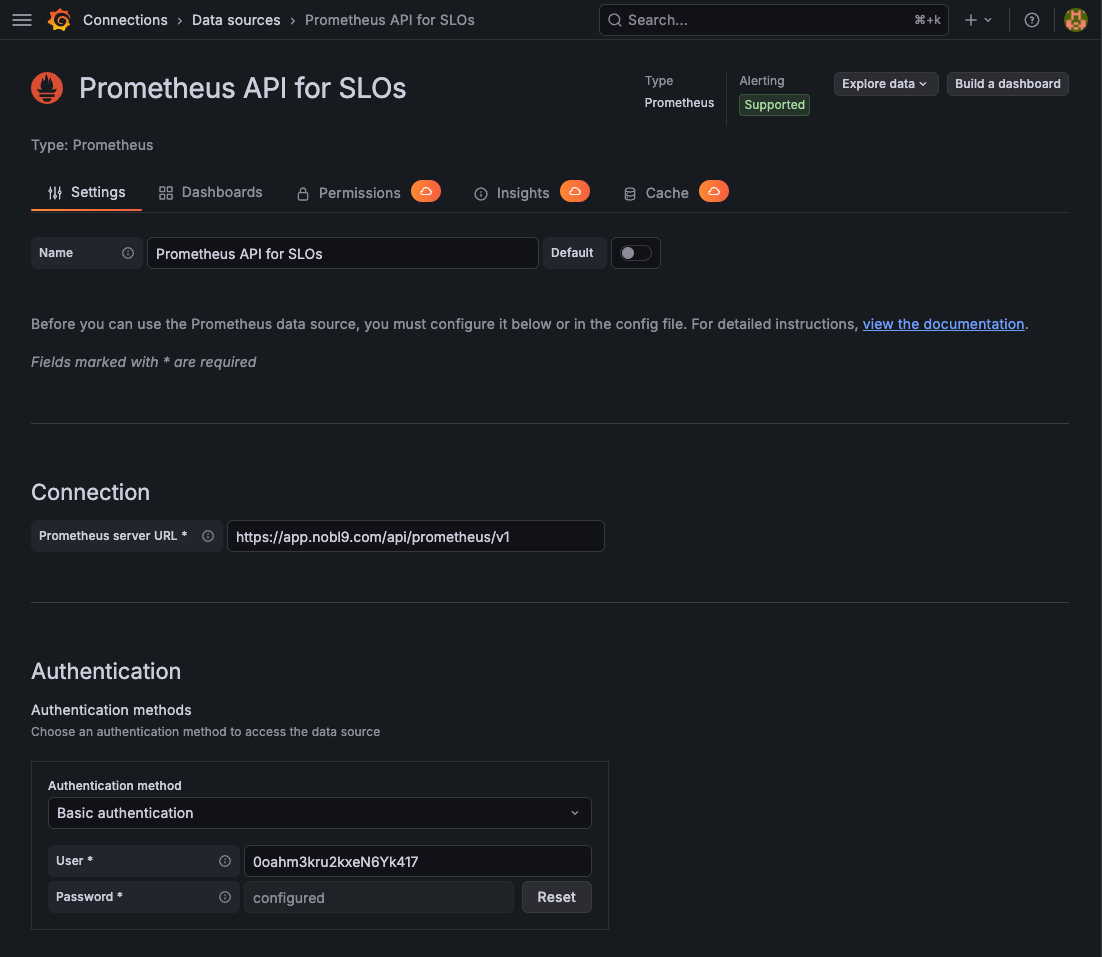
For more options, see the Grafana Prometheus data source documentation.
Prometheus client SDKs
Any Prometheus-compatible query client works against the API. The libraries below cover the common languages — point each one at the base URL above and configure HTTP Basic auth.
| Language | Library | Maintainer | Link |
|---|---|---|---|
| Go | nobl9-go (built-in Prometheus client) | Nobl9 | github.com/nobl9/nobl9-go |
| Go | client_golang (api + api/prometheus/v1) | Official Prometheus | github.com/prometheus/client_golang |
| Python | prometheus-api-client | Community | github.com/4n4nd/prometheus-api-client-python |
| JavaScript / TypeScript | prometheus-query | Community | github.com/samber/prometheus-query-js |
| Ruby | prometheus-api-client | Community | github.com/prometheus/prometheus_api_client_ruby |
| Rust | prometheus-http-query | Community | github.com/puetzp/prometheus-http-query |
If your language isn't listed, any HTTP client works too — the API speaks the standard Prometheus HTTP API.
Code samples
Each sample below prints the remaining error budget of every objective of a given SLO by running
the query budget{project="...",slo="..."}.
- The Go sample uses the Prometheus client built into
nobl9-go, which reads your credentials and API URL from your
local
sloctlconfiguration, so ifsloctlis configured it runs as-is. - The Python and JavaScript samples read credentials and the base URL from environment variables.
- Go (nobl9-go)
- Python
- JavaScript
go mod init query_budget
go get github.com/nobl9/nobl9-go github.com/prometheus/common
go run . my-project my-slo
// Command query_budget prints the remaining error budget of every objective of
// a given Nobl9 SLO by querying the Prometheus API for SLO time series.
//
// It uses the Prometheus client built into nobl9-go, which reads credentials and
// the API URL from your local Nobl9 (sloctl) configuration. If sloctl is already
// configured, the program runs as-is:
//
//	go mod init query_budget
//	go get github.com/nobl9/nobl9-go github.com/prometheus/common
//	go run . <slo-project> <slo-name>
package main

import (
	"context"
	"fmt"
	"log"
	"os"
	"sort"
	"time"

	"github.com/prometheus/common/model"

	"github.com/nobl9/nobl9-go/sdk"
	prometheusV1 "github.com/nobl9/nobl9-go/sdk/endpoints/prometheus/v1"
)

func main() {
	if len(os.Args) != 3 {
		log.Fatalf("usage: %s <slo-project> <slo-name>", os.Args[0])
	}
	project, slo := os.Args[1], os.Args[2]

	log.Println("Reading Nobl9 SDK configuration...")
	client, err := sdk.DefaultClient()
	if err != nil {
		log.Fatalf("failed to create Nobl9 client: %v", err)
	}

	query := fmt.Sprintf(`budget{project=%q,slo=%q}`, project, slo)
	log.Printf("Executing query: %s", query)

	ctx, cancel := context.WithTimeout(context.Background(), 30*time.Second)
	defer cancel()

	// nobl9-go exposes the Prometheus API directly: it handles authentication
	// and routes the request to your organization's Prometheus endpoint.
	result, warnings, err := client.Prometheus().V1().Query(ctx, prometheusV1.QueryRequest{
		Query: query,
		Time:  time.Now(),
	})
	if err != nil {
		log.Fatalf("query failed: %v", err)
	}
	for _, w := range warnings {
		log.Printf("warning: %s", w)
	}

	vector, ok := result.(model.Vector)
	if !ok {
		log.Fatalf("unexpected result type %T", result)
	}
	if len(vector) == 0 {
		log.Fatalf("no data for SLO %q in project %q", slo, project)
	}

	sort.Slice(vector, func(i, j int) bool {
		return vector[i].Metric["objective"] < vector[j].Metric["objective"]
	})

	fmt.Println("Budget for objectives:")
	for _, sample := range vector {
		fmt.Printf("- %s: %f%%\n", sample.Metric["objective"], float64(sample.Value)*100)
	}
}
pip install prometheus-api-client
export NOBL9_CLIENT_ID=... NOBL9_CLIENT_SECRET=...
export NOBL9_PROM_URL=https://app.nobl9.com/api/prometheus/v1
python query_budget.py my-project my-slo
"""Print the remaining error budget of every objective of a Nobl9 SLO.

Uses the third-party prometheus-api-client library against the Nobl9
Prometheus API for SLO time series.

    pip install prometheus-api-client
    export NOBL9_CLIENT_ID=...        # access key Client ID
    export NOBL9_CLIENT_SECRET=...    # access key Client Secret
    export NOBL9_PROM_URL=https://app.nobl9.com/api/prometheus/v1
    python query_budget.py <slo-project> <slo-name>
"""

import os
import sys

from prometheus_api_client import PrometheusConnect


def main() -> None:
    if len(sys.argv) != 3:
        sys.exit(f"usage: {sys.argv[0]} <slo-project> <slo-name>")
    project, slo = sys.argv[1], sys.argv[2]

    # PrometheusConnect appends "/api/v1/query"; pass the "/api/prometheus/v1"
    # base URL and the access key as a Basic auth (id, secret) pair.
    prom = PrometheusConnect(
        url=os.environ["NOBL9_PROM_URL"],
        auth=(os.environ["NOBL9_CLIENT_ID"], os.environ["NOBL9_CLIENT_SECRET"]),
        disable_ssl=False,
    )

    query = f'budget{{project="{project}",slo="{slo}"}}'
    result = prom.custom_query(query=query)
    if not result:
        sys.exit(f'no data for SLO "{slo}" in project "{project}"')

    print("Budget for objectives:")
    for series in sorted(result, key=lambda s: s["metric"].get("objective", "")):
        objective = series["metric"].get("objective", "?")
        budget = float(series["value"][1]) * 100
        print(f"- {objective}: {budget:.6f}%")


if __name__ == "__main__":
    main()
export NOBL9_CLIENT_ID=... NOBL9_CLIENT_SECRET=...
export NOBL9_PROM_URL=https://app.nobl9.com/api/prometheus/v1
node query_budget.mjs my-project my-slo
// Print the remaining error budget of every objective of a Nobl9 SLO.
//
// Uses the built-in fetch API (Node.js 18+) against the Nobl9 Prometheus API
// for SLO time series. No external dependencies.
//
//   export NOBL9_CLIENT_ID=...        # access key Client ID
//   export NOBL9_CLIENT_SECRET=...    # access key Client Secret
//   export NOBL9_PROM_URL=https://app.nobl9.com/api/prometheus/v1
//   node query_budget.mjs <slo-project> <slo-name>

const [project, slo] = process.argv.slice(2);
if (!project || !slo) {
  console.error("usage: node query_budget.mjs <slo-project> <slo-name>");
  process.exit(1);
}

const base = process.env.NOBL9_PROM_URL;
const auth = Buffer.from(
  `${process.env.NOBL9_CLIENT_ID}:${process.env.NOBL9_CLIENT_SECRET}`,
).toString("base64");

const query = `budget{project="${project}",slo="${slo}"}`;
const url = `${base}/api/v1/query?query=${encodeURIComponent(query)}`;

const response = await fetch(url, {
  headers: { Authorization: `Basic ${auth}` },
});
if (!response.ok) {
  console.error(`request failed: HTTP ${response.status} ${await response.text()}`);
  process.exit(1);
}

const body = await response.json();
const series = body.data?.result ?? [];
if (series.length === 0) {
  console.error(`no data for SLO "${slo}" in project "${project}"`);
  process.exit(1);
}

console.log("Budget for objectives:");
const byObjective = (a, b) =>
  (a.metric.objective ?? "").localeCompare(b.metric.objective ?? "");
for (const s of series.sort(byObjective)) {
  const budget = Number(s.value[1]) * 100;
  console.log(`- ${s.metric.objective}: ${budget.toFixed(6)}%`);
}
Running any of them produces output similar to:
Budget for objectives:
- objective-1: 95.405634%
- objective-2: -182.190787%