Nobl9 application (1.174.0)
Release details
new Organization status
Organization status is currently in Beta for Enterprise customers. Breaking changes may occur in future updates to ensure the best possible performance. See pricing and plans to learn more.
We're excited to announce the rollout of the Organization status feature that provides the capabilities of real-time disruption monitoring across your organization, system, or application performance right from the Nobl9 Web application. It gives SREs, engineers, product owners, managers, and support teams a shared, SLO-aware view of operational health without navigating individual SLO configurations or external status pages.
Organization status is built around three core views:
Status page
The Status page is the main real-time view showing the health of your organization's components. It reflects the current operational state and provides a 90-day historical timeline per component, so teams can assess system health and track changes over time at a glance.
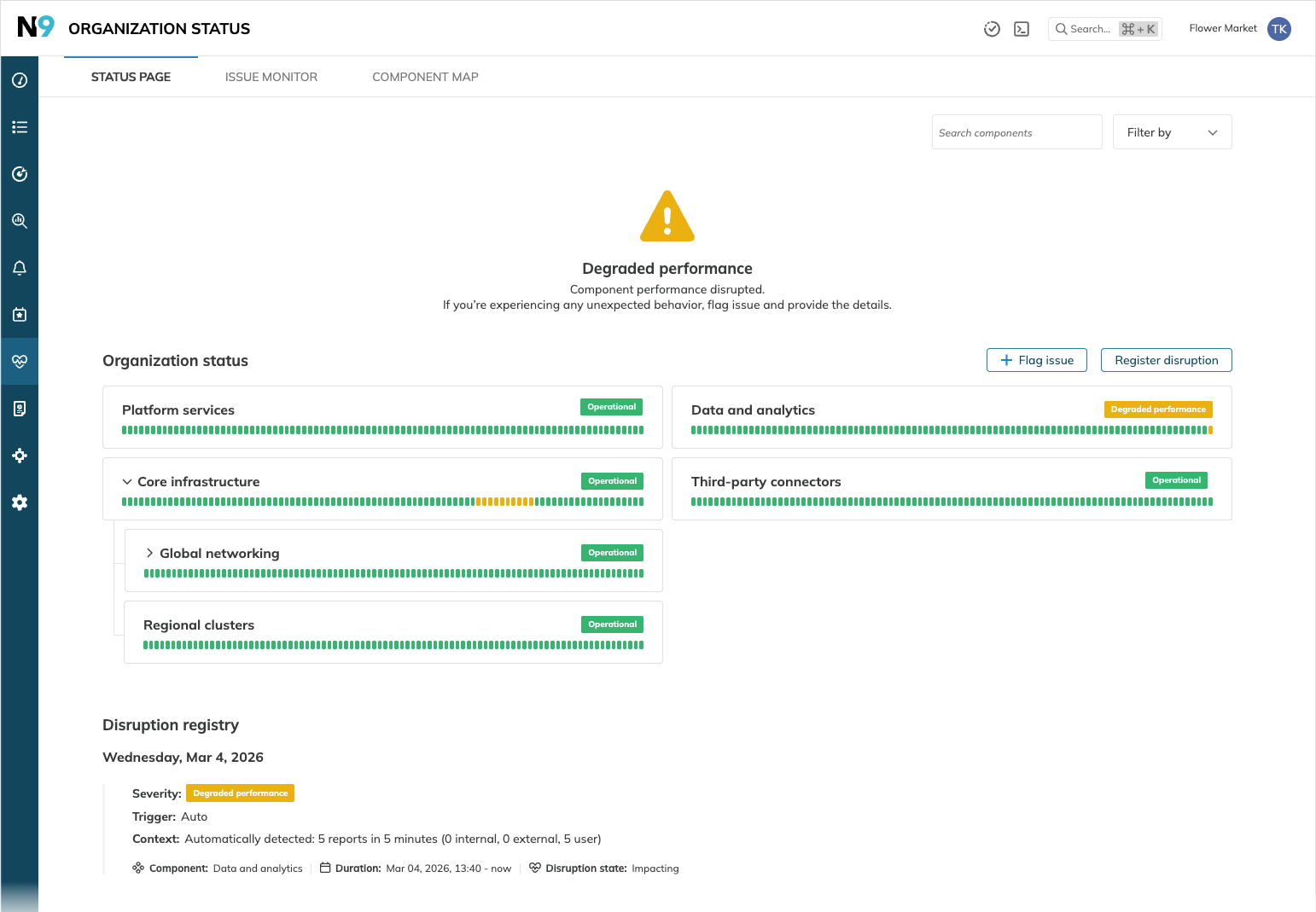
- Overall status reflects the most critical status across all components.
- Component timeline propagates the most critical status from an impacted component upward.
- Disruption registry provides a chronological journal of the 100 most recent disruptions across components.
Any user can search and filter by component name, status, or label, and flag issues directly from this view. Organization admins can register, update, clear, and delete disruptions and handle issues.
Impact monitor
The Impact monitor tab (admin-only) provides an aggregated view of all issues and impacted components across your organization.
- Summary tiles show the count of impacted components and time-based issue volume breakdowns.
- The Impact scope table lists impacted components.
- The Latest issues table provides a chronological log of all issues.
Component map
The Component map is an admin-only tool for building and managing the hierarchical structure of your organization's components. It allows nesting components to reflect organizational dependencies and linking SLOs with attached alert policies to streamline automatic disruption detection.
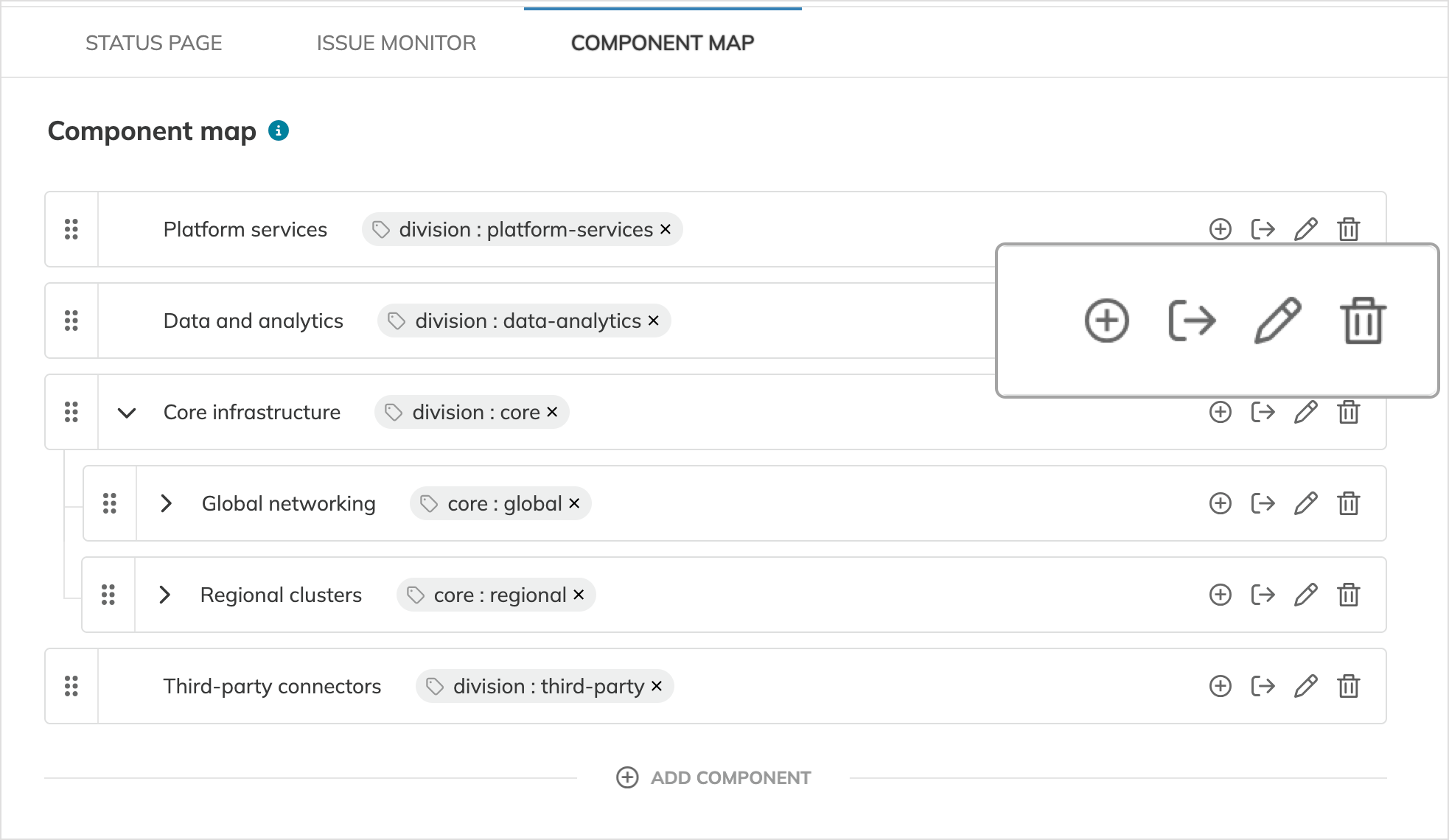
Key capabilities:
- Add components and nest them to mirror your organizational structure.
- Link SLOs to terminal components to feed SLO alert signals directly into Organization status.
- Drag and drop to reorder components within the same hierarchy level.
- Move, edit, or delete components, including all their nested subcomponents, linked SLOs, and associated disruptions.
Disruption detection and management
Disruptions drive component status changes in Organization status and can be triggered in two ways:
Auto-detection—the system automatically transitions a component to Degraded performance when issues aggregated in 5-minute intervals exceed the following default thresholds:
- 5 issues in 5 minutes for user flags or external telemetry signals
- 2 issues in 5 minutes for Nobl9 SLO alerts
Manual registration—Organization admins can force a component into Degraded performance or Major outage immediately, without waiting for thresholds. Admins can also escalate an auto-detected disruption to Major outage, update context, clear a resolved disruption, or permanently delete it.
Component statuses propagate upstream automatically. If a child component is disrupted, all parent components inherit the most severe status.
Issue sources
Issues that contribute to disruption thresholds can come from three sources:
- User flags—any user with access to Organization status can flag an issue for a component from the Status page or the component details page.
- Nobl9 SLO alerts—SLOs linked to components automatically send triggered alerts as issues.
- External telemetry—third-party tools can send issue signals using the new
POST /status-page/issues/externalAPI endpoint.
Component and disruption details
Clicking a component name opens the component details page, which provides a deep dive into that component's health history, linked SLOs, and associated issues, along with admin controls for registering and clearing disruptions.
Each disruption has its own disruption details page, accessible from the Disruption registry. It displays full context including severity, trigger type, duration, event timeline, and all contributing issues.
Access control
Organization status follows Nobl9's role-based access model:
| Role | Access |
|---|---|
| Organization admin | Create and modify component structure; register, update, clear, and delete disruptions; force component statuses; flag issues |
| Organization user | View Status page, Disruption registry, component details, and disruption details; flag issues |
new Dash0 integration
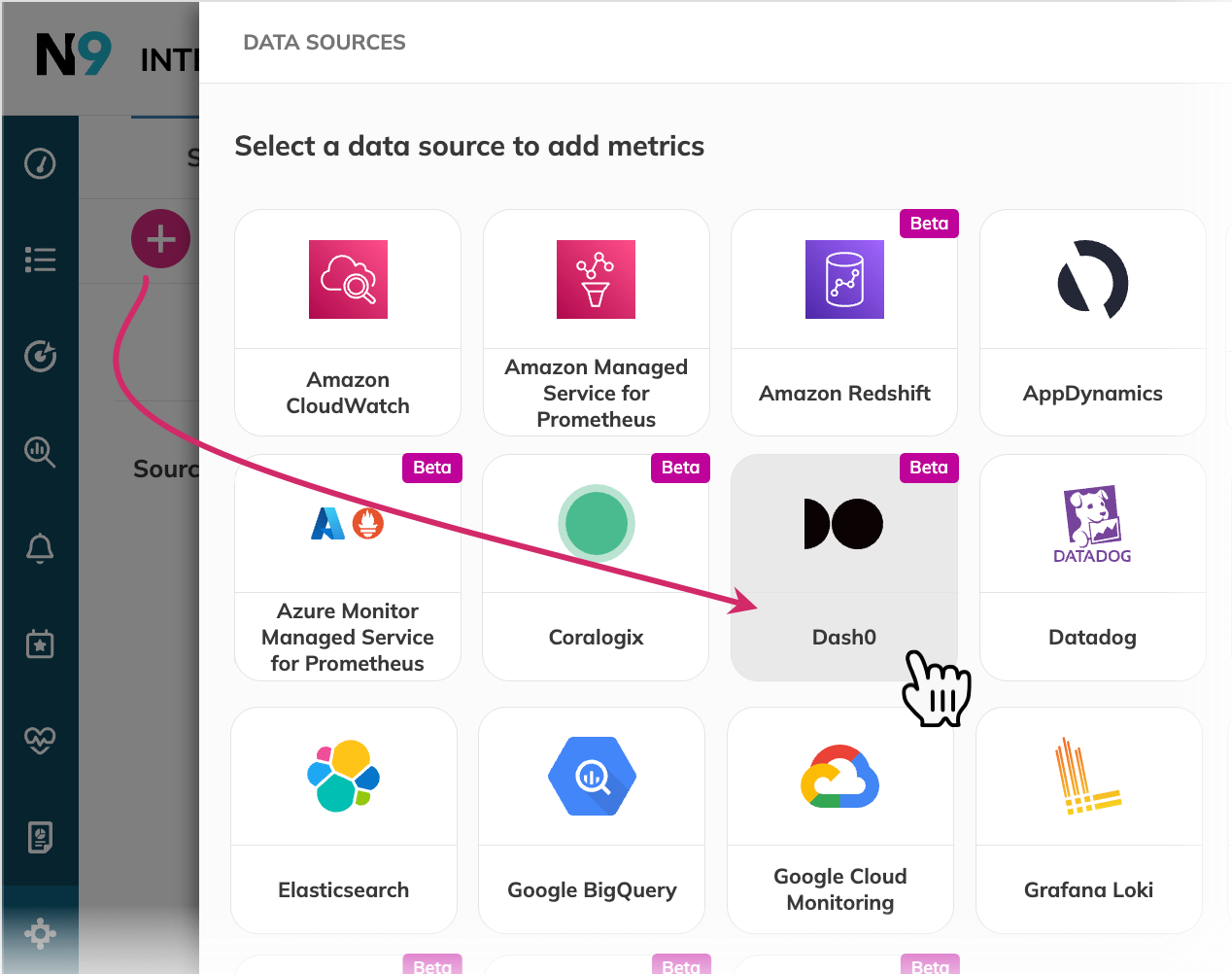
Nobl9 now integrates with Dash0, an OpenTelemetry-native observability platform with a Prometheus-compatible API. You can connect Dash0 as a data source and use standard PromQL to build SLOs on top of your high-resolution telemetry.
Both connection methods are supported:
- Direct connection—authenticate using a Dash0 Auth Token and the server URL, configured directly in Nobl9 without deploying an agent.
- Agent connection—deploy the Nobl9 agent with the
DASH0_AUTH_TOKENenvironment variable to authenticate requests.
Both threshold and ratio SLO metric types are supported using standard PromQL syntax.
improved ABC pattern-based Sumo Logic queries
Sumo Logic Metrics SLOs now support multi-query (ABC pattern) mode, consistent with Sumo Logic's native query chaining syntax.
With ABC pattern queries, you define up to six individual metric queries in lettered rows (#A–#F) and combine them into a single mathematical formula in the final query row. The resulting formula defines the SLI for the objective.
For example, to track an error rate:
Query #A:  metric=request_count
Query #B:  metric=request_count status_code=5*
Query #C:  (#B / #A) along service, env
- Capabilities
- ABC pattern queries are available for Metrics SLOs only. Logs SLOs continue using the single-query format.
- You can add or remove individual rows as needed.
- Configuration
- Existing single-query SLOs are automatically normalized; they remain fully backward compatible.
- In YAML, use either
sumoLogic.query(single) orsumoLogic.queries(ABC pattern), but not both.
- Requirements
ABC pattern-based syntax is supported as Beta. This means your Sumo Logic data source must meet these requirements:- Agent connection—version
0.109.0-betaor higher - Direct connection—must be on the Beta release channel
- Agent connection—version
improved Increased label limit per resource
You can now add up to 100 labels per resource—SLOs, services, projects, alert policies, and annotations. This applies across the Nobl9 Web, API, and YAML resource definitions.